How To Podcast - Chapter 2 What software do you need?

Here is the basics of what you need for software. You have to create a podcast in some type of audio file. You have to be able to modify that audio file then you have to transform it into a MP3 file so it can be listened to by people with podcast feeders.

Getting this software is done in two steps:

Step 1: Get the Audio manipulation software to create your podcast

This is called mixing software and you can spend lots of money to get high end professional software but for now you can just get some free software that is easy to use and is plenty sufficient. The program we will be using is called Audacity. You can download it for free from here. Audacity mixing software It is very basic software and easy to install and use. Simply follow the Audacity instructions.

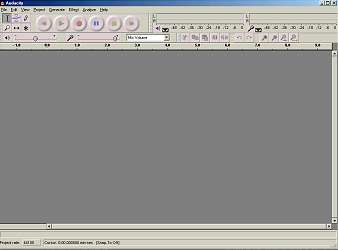
When you open it up it looks like this:

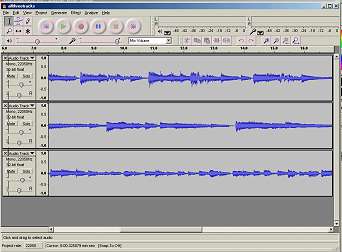
This is the blank workspace. There is currently no music or sound loaded into it. When you start making a podcast you will get something like the following screen. It shows several tracks which include introductory music, speech and soundeffects.

You are almost done with the software. But there is one further step you need to take. Audacity does not create files in MP3 format. For this you need to get one more free program. It is called LAME. All you have to do is download and unzip the program to your computer and make a note of where you store it. Then there is only one further step to take. When you create your first podcast and you try to save it as an MP3 Audacity will ask you where you keep your MP3 encoder program. This is the LAME program. Only this first time you show Audacity where you keep the program and then you don't need to worry about it again.

It is real easy to do. The LAME program comes with instructions on how to do this. Download LAME here. LAME Download

You can also crank up Audacity and simply tell it where to find the LAME dll before you even make a podcast. In Audacity simply select Edit | Preferences | File Formats and click on the find Library button then browse to where you put the LAME program and you are done(select the .dll file).

Now you are ready to make your first podcast - Let's move on to the next step in the tutorial: Using the software to create your first podcast


Custom Search

Return to Stormthecastle.com
Home


SUBJECTS

Fantasy
Classical Guitar
Dioramas
Make Video Games
Model Rockets
Astronomy & Telescopes
Art & Drawing
For Writers
For Webmasters
Miniatures
The Meaning of Life
Homebrewing Mead
How to Make a....
series of tutorials

Stop Motion Animation
Fantasy Art School
Terrariums
R/C Airplanes
Fantasy for Writers
Fantasy Swords

Projects

Project list is here

Downloadable Projects here

Make a Trebuchet
Make a Paper Castle
Rocket Launcher
Make a Catapult
Make a Terrarium
Shoebox Diorama
Sculpting Miniatures
Fantasy Diorama
Shadowbox Fantasy
Make a videogame
Rainforest Diorama
Stop Motion Animation
Make a Volcano
A Paper fantasy game
Make a boxkite
The Warcraft VR Chamber
The Big Wall Diorama
Make a cardboard sword
Cardboard Shield
Dragon Pinata
Nature Walks

MY STORES

Dioramas & miniatures
Classical Guitar store
Telescope Store

Terrarium Store
Fantasy Art Books
Model Rocket Store
Siege Engine Store
R/C Airplanes Store
Swords

LINKS

My Youtube Channel
Twitter - Follow Me
Banner Exchange
MoreLinks

HobbyLinks
List of Hobbies
Things
Other Websites
Kindred Spirit Links

Earning money
with your website

My Other Websites

The Telescope Nerd
Castlefiction.com

Epic-Fantasy.com
The Fantasy Blog
The Fantasy Guide
Medieval Castles
Medieval Swords
Medieval Weapons
The Knight Medieval
willkalif.com
make-video-games.com

All Materials, unless
otherwise stated are
Copyright©2000-2009
Kalif Publishing and
StormtheCastle.com

For more information or
for customer support
check out
copyright and info page


Hi, Thanks for visiting
my website.
My name is Will.
If you have any questions
or want to contribute
to this website:

---------